Text Formatting
The FAWM website has several ways to format text in your songs, comments, profile, and other posts for easy readability and website navigation. We support:
- FAWM-specific markup for links, tags, and embedding media
- Markdown for even more text formatting
- ChordPro notation for song lyrics
FAWM-Specific Markup
@Mentions
Type @username to flag a fawmer. The username becomes a clickable profile link:
After you type @, you'll see autocomplete suggestions.
That fawmer also gets notified in their home feed when they are flagged in new comments and forum posts. If they change their username, the link will automatically update to the new one!
#Hashtags
Use #hashtags to easily tag and categorize your songs, profile, and other posts:
After you type #, you'll see autocomplete suggestions.
The first three (3) hashtags in a song's liner notes will be displayed in the songs list on your profile or the songs page. Tags are also searchable, so other fawmers can find songs with similar styles, instruments, or themes!
Emoji
Certain keywords in between colons :: display emoji. For example, 😅 ❤️ 🤘 is written:
After you type :, you'll see autocomplete suggestions.
FAWM will also simply display any emoji you enter or copy-paste into a text form, without this special formatting.
URL Links
In general, any time you type a URL (or web address) beginning with http:// or https://, it automatically turns into a clickable link:
Videos
One exception to the URL rule above: YouTube video URLs (i.e., youtube.com or youtu.be) will automatically embed the target video in your post. This does not work for shorts!
Images
Another exception to the rule is image URLs. Any URL that ends with one of the following file extensions will automatically embed that image in your post instead:
.apng.gif.jpeg.jpg.png.svg.webp
Image Hosting!
New for FAWM 2026!
As a thank-you benefit for fawmers who donate $25 or more, you can easily host images and insert them in your songs, bios, and other posts, directly from FAWM's file servers!
- Drag and drop: Simply drag an image file from your computer and drop it onto any text area input. The image is uploaded and inserted at the cursor position.
- Paste from clipboard: You can also paste images using CTRL + V on PC or CMD + V on Mac. This is handy for screenshots or images you've copied from other apps.
Once uploaded, the image URL is inserted using Markdown (see below) and appears inline with the text of your song, comment, profile, or forum post!
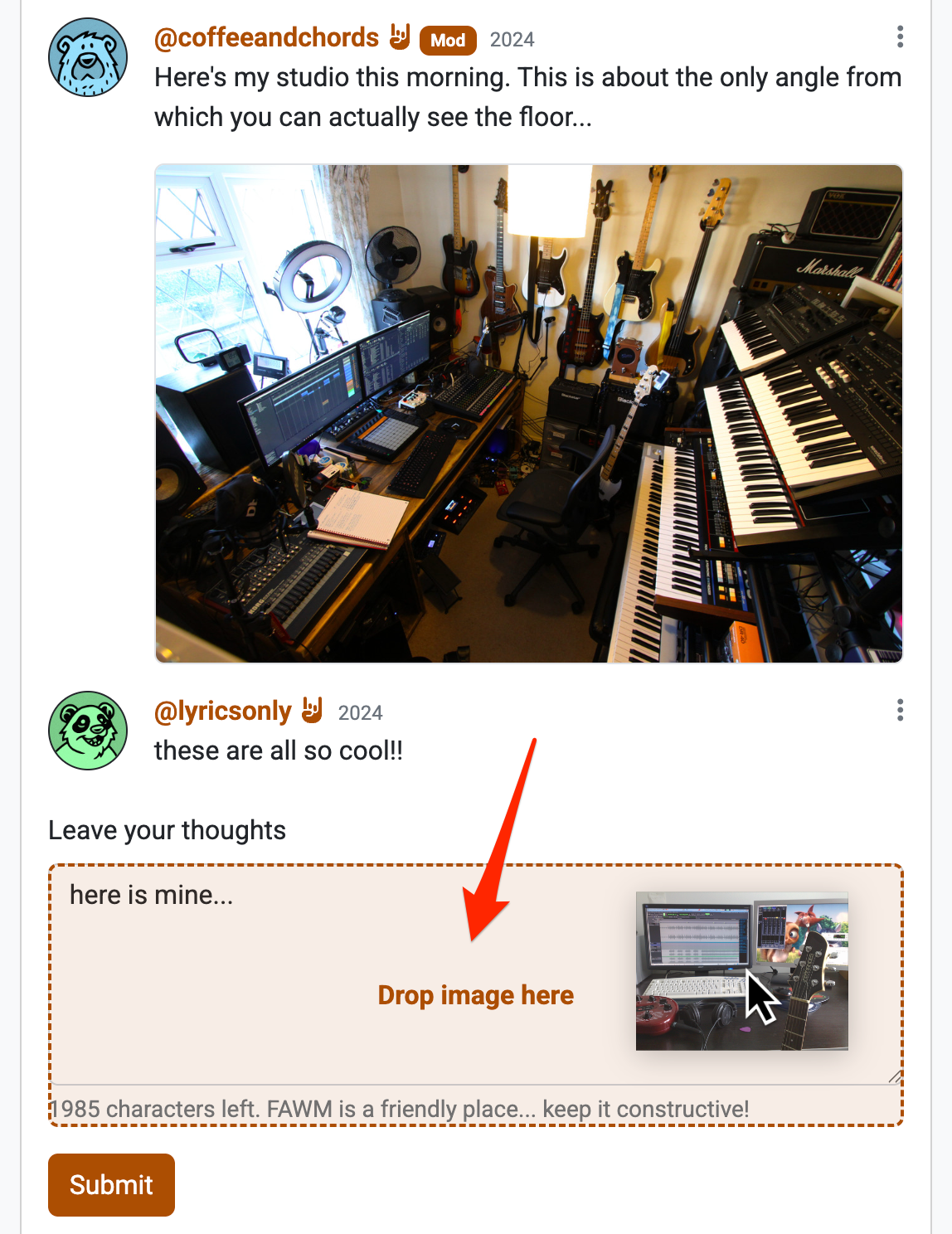
Image hosting is for $25+ donors only
If you have not donated $25 or more, you can still embed images in your posts. However, you will need to host them on your own server, or use a third-party service like Imgur, Postimages, etc.
Markdown
New for FAWM 2026!
FAWM also supports a flavor of Markdown, a markup language for easily formatting plain text. If you frequent Slack, Discord, or Reddit, you're probably already familiar with it!
Cheat Sheet
Here's a cheat sheet for the most common Markdown elements:
| What you type | What you get |
|---|---|
**bold** |
bold |
_italic_ |
italic |
~~strikethrough~~ |
|
[link text](https://example.com) |
link text |
 |
Tip: Images and accessibility
When embedding images, you can used the full Markdown image syntax to add alt text, instead of plain image URLs. This makes your image more accessible to screen readers for the visually impaired:
Block Quotes
Use > at the start of a line to create a quote:
This can be useful for citing lyrics, prompts, or feedback from others!
Unordered Lists
Use -, *, or + followed by a space:
Ordered Lists
Use numbers followed by a period:
Code and Preformatted Text
For code snippets or text that should preserve spacing exactly, use backticks `:
- Inline code:
`like this` - Code blocks: wrap with triple backticks (
```)
Horizontal Rules
Create a horizontal divider with three or more dashes -, asterisks *, or underscores _:
Line Breaks
To create a line break without starting a new paragraph, add two spaces at the end of a line before pressing Enter:
Without the two trailing spaces, Markdown will "un-wrap" the lines into a single paragraph.
What is not supported
For security and simplicity, some Markdown features are not available on FAWM:
- HTML tags - Raw HTML is stripped for security
- Headers (
# Heading) - Use bold text instead for emphasis - Tables, footnotes, definitions, ... or other more advanced formatting
ChordPro Notation
New for FAWM 2026!
FAWM supports a special markup for displaying chords above your lyrics, inspired by ChordPro notation. Simply insert chord names in square brackets [] inline with your text:
The chords will be displayed just above your the lyrics, making it easy for others to play along with your song — or for you to remember later!
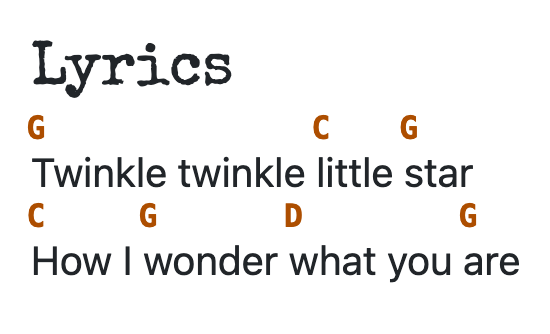
The site can recognize most common chord variations, comprising:
- a capitalized root note, e.g.,
[C],[F#], or[Bb] - an optional qualifier, e.g.,
[Am](minor),[Gaug](augmented) - an optional extension, e.g.,
[D7],[Esus4] - an optional bass: slash
/followed by another root note, e.g.,[C/B]
This formatting can be useful for "open" collaborations or fakebook challenges, where another fawmer interprets the melody, tempo, or other elements to "finish" a song. If you already use other ChordPro-compatible software, this also makes it easy to copy-paste between apps!
What is not supported
For simplicity, we only support chord formatting from the ChordPro notation standard. Title, song section, and other metadata are not recognized. You can simply use Markdown (see above) if you wish to add emphasis.
Chord detection only works for the Lyrics field of your songs.