Account Management
Signing Up
To sign up for a FAWM account, go to fawm.org/signup. All you need is:
- A unique username
- A valid email address
- A password of your choice
If you encounter an error (e.g., the username was already taken), simply correct it at try again.
Important: Confirm your account
After signing up, check your email for a confirmation link. You will need to click this before you can begin posting songs, comments, forums, and other messages to the FAWM website.
If you need to, you can resend a new link from the alert at the top of your home feed (see below).
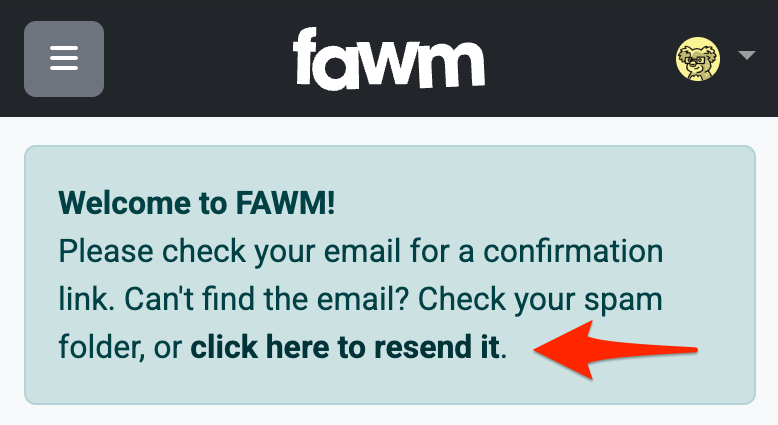
The link is only valid for one hour after you create an account. Be sure the check your spam folder just in case!
Logging In And Out
Once you have an account, you can log in at fawm.org/login.
If you forgot your username, you can also login using email (and vice versa).
You can access important account details from the drop-down menu in the upper-right of every page at any time. It is in the website header labeled with your avatar image:
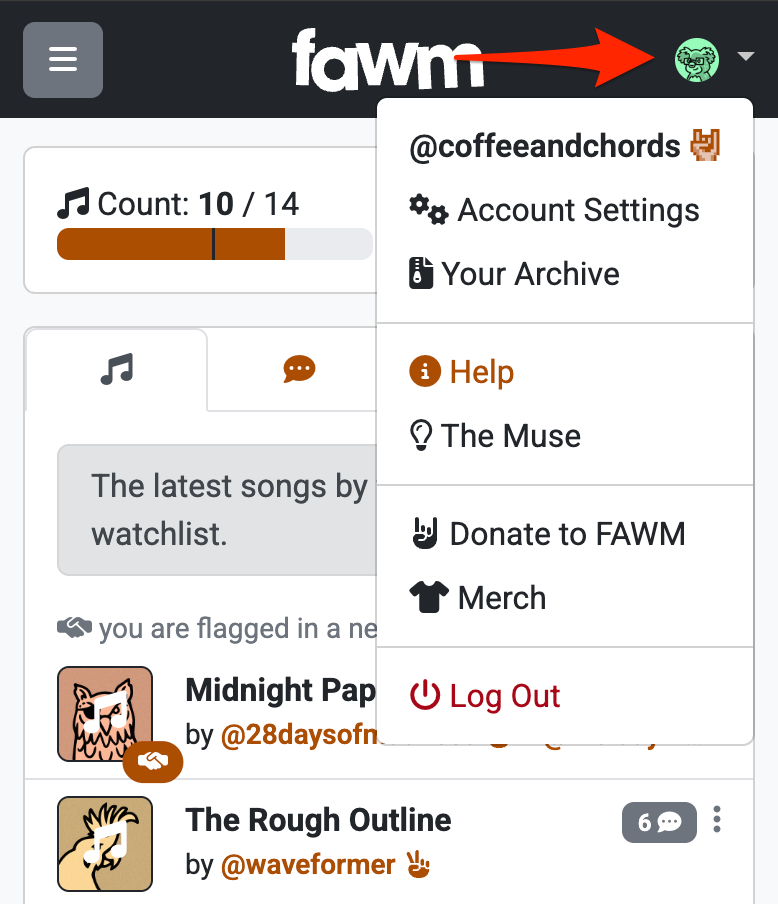
From here you can:
- View and/or edit Your Profile (see below)
- Update your Account Settings (see below)
- Access your archive
- Link to this help site
- Link to the songwriting tools at muse.fawm.org
- Easily donate or buy merch
- Log Out of your account
If you're having trouble logging in
- Did you forget your password? Reset it at fawm.org/reset_password_request
- Are you checking the right email account for verification/password messages?
- Do you have the right username? Check the URL
fawm.org/@usernameand be sure that's your profile - Is the fawm.org website down? Hopefully not, but it's worth checking!
- If all else fails, you can try emailing support, and an admin can help you recover your account
The Home Feed
By default, once you log in you are directed to your home feed. This is a personalized summary of all your FAWM activity: progress against your goals, new music by fawmers you follow, new comments on your songs and collaborations, and more.
You can easily return to the home feed by clicking the Home link in the main navigation menu, or clicking the "FAWM" logo at the top of every page.
Progress Meters
At the top of the home feed are two progress meters: the FAWM songwriting goal (14 songs), plus a customizable commenting goal:

The thin black line shows a "target" value:
- For song count, the target gradually moves from left to right during the challenge
- For comment ratio, the target remains centered at "one-to-one"
When a progress bar is orange it means you are meeting or exceeding the target goal at this point. Congrats! If it is gray, it means you may have some catching up to do...
You can customize this display under the Stats tab (see below).
Songs Tab
The Songs tab lists the most recent songs by fawmers in your watchlist, as well as any collaborations that others have posted including you.
See Search & Discovery for a more detailed explanation of the song listing layout.
Comments Tab
The Comments tab shows the most resent comments left by others, on your songs and collaborations. You can easy reply or reciprocate from here.
Misc Tab
The Misc tab is a "catch-all" for other kinds of community interactions, including:
- When you are @mentioned ("flagged") by another fawmer in one of their song comments, profile messages, forum posts, etc.
- New messages on your profile ("soundboard")
- Replies to your comments and messages on another fawmer's profile or songs
- Notifications of new followers
Each of these updates is accompanied by a handy link to its original context, in case you want to reply, add someone to your watchlist, etc.
Stats Tab
Finally, the Stats tab is where you can check in on various stats beyond the progress bars above. These include your collaborations, zong-busts, forum activity, and more. These statistics are strictly private. Only your song count is shared publicly.
Expand the Goal-Tracking Preferences link to customize your progress meters.
- Progress meters are shown by default, but you can turn them off if you want
- The default for tracking comment progress is Comment Ratio, but you can change this to a fixed Comment Count goal if you prefer
Your comment ratio is the number of comments given to received. Some fawmers keep track of this and try to keep it close to one (that is, giving as many comments as you receive). After many requests, the website can now do this for you! Our analysis of past FAWMs shows that the average fawmer tries to keep this ratio close to one.
If you opt for a fixed comment count goal instead, the thin black target will move left to right, as with the song count meter.
Your Profile
Your Profile is how you present yourself to the FAWM community!
You can customize it with things like an avatar image, brief bio, and social links.
FAWM will also automatically display your songwriting progress, a chronological list of all your songs for others to browse and comment on (with your "pinned" songs at the top!), and a "soundboard" for direct messages from other fawmers at the bottom.
To edit your profile information, simply click the Edit button below your username and to the right of your avatar image:
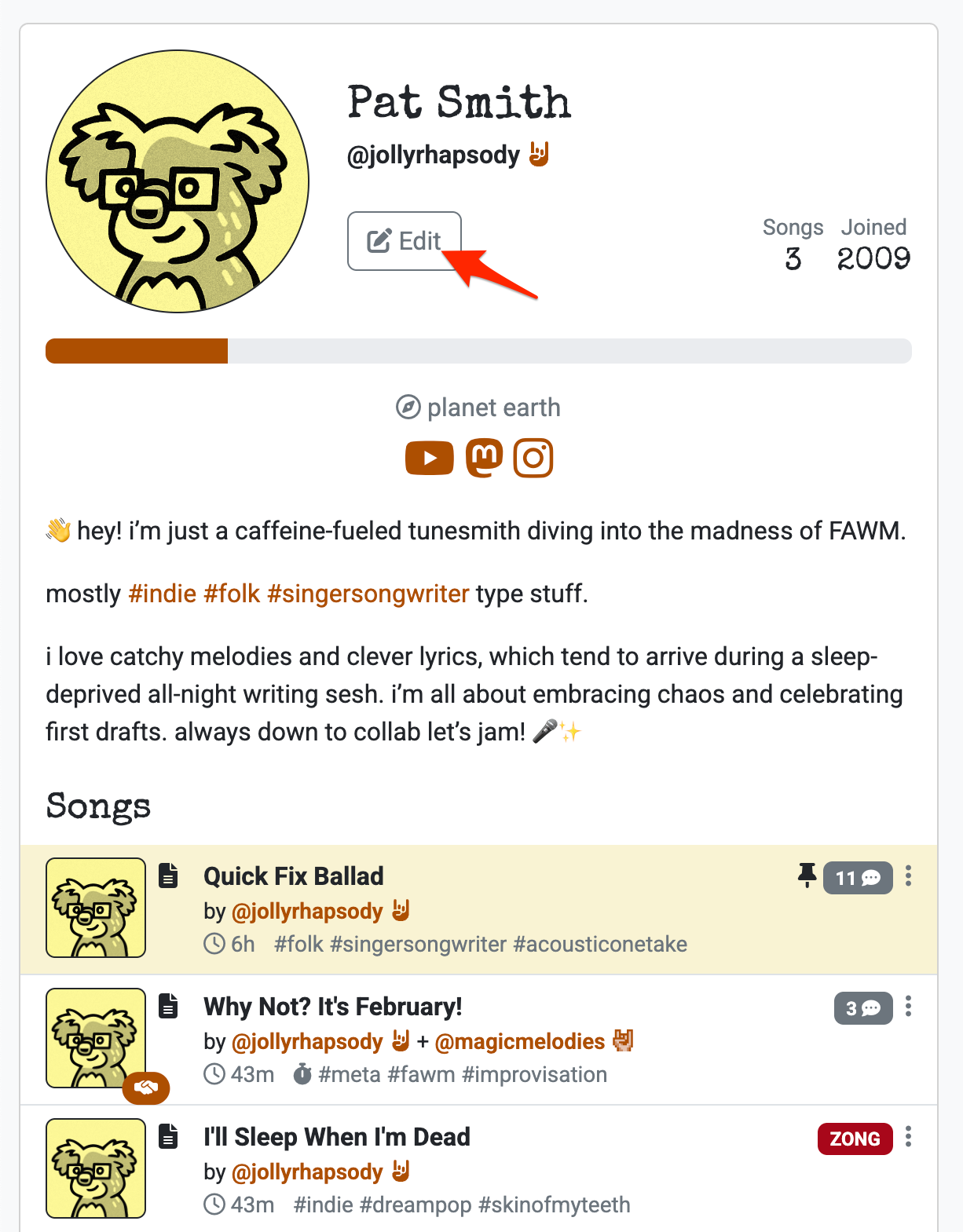
This will take you to a form where you can edit the following:
- Display Name: Something other than your
@username, if you wish - Custom Profile Image: Upload an image file as your "avatar" (optional)
- Profile Image Color: Use the slider to choose the hue for your "avatar"
- Fawmstar Rock Hands: For fawmers who donate!
- About/Bio: A brief self-introduction; pronouns and #hashtags are encouraged
- Location: Your city, country, or any snark location (optional)
- Website: Your musical project's main website URL (optional)
- Social Media Links: Up to 5 social media accounts, which will be displayed as a linked icon to each profile on an external website (e.g., )
For information of formatting text or embedding images in your bio, see Text Formatting
If you want to change your username, that's done in Account Settings (see below).
Sharing your email
FAWM does not have a "DM" feature, but you can enter an email address in one of the 5 social link slots if you want. If you do, FAWM wil display an envelope icon mail-to link available only to logged-in fawmers.
Why was my avatar image altered!?!?
FAWM converts your image to black & white and "prints" it on the color you choose. Why?
This process has roots in "avatargate" from FAWM 2022, when major server problems prevented image uploads (see History). Instead, everyone was assigned a random instrument image and color. Fawmers actually had a lot of fun with this (see also fiats.info), and we heard from some (especially fawmers from under-represented groups) that they thought the added uniformity may have led to more equitable feedback.
When we rebuilt the FAWM site from scratch, we adopted "zine-like" avatars like this for several reasons:
- They evoke a DIY/indie aesthetic, consistent with the FAWM ethos
- They serve as visual reminders that FAWM is different than social media
- They emphasize limitations, which can often inspire creativity
- They convey a shared experience (although not conformity), which is what FAWM is!
We understand that not everyone agrees with these, and we've learned that the images make site navigation challenging for some neurodivergent fawmers. We are listening! We may consider changes in the future.
Account Settings
You can access your Account Settings from the drop-down menu (with your avatar image) in the upper-right of every page.
This takes you to a form where you can:
- Change your Email address
- Change your Password
- Change your Username
- Set your Profile Privacy level (see Safety & Privacy for details)
- Choose your Custom Player style (see Posting Songs & Demos for details)
- Opt in/out of Notifications (if you have unread comments for several days)
Important: Limits on username changes
You can only change your username once every 120 days (effectively, once per FAWM songwriting challenge). This is so repeated username updates can't cause confusion during such a short, frenzied event!
Deleting Your Account
To be able to delete your FAWM account, you will need:
- Your registered username or email address
- Your password
See Logging In And Out above if you have lost or forgotten your password.
Once logged in, click Account Settings from the drop-down menu in the upper-right, then scroll to the bottom of the page, and click the Delete Account button. You will be prompted several times to confirm.
The following data will be permanently removed from FAWM servers:
- Your profile and all personal information (bio, location, links, etc.)
- Your profile avatar image
- All of your songs
- All comments on your songs and profile made by other fawmers
- Any audio or image files hosted by FAWM for your songs and posts
- All follow, mute, and block relationships to other FAWM accounts
Any song or profile comments and forums posts you left will remain in place, but their contents will be replaced with "(deleted)" and attributed to a @deleted placeholder account, to preserve transparency and anonymity:

Deletion is permanent!
Be aware that deleting your account is immediate and irreversible! You may wish to archive your data first.